Prompts
General Structure
Prompts are specified as markdown files using Commonmark syntax with a Github-Flavored Markdown plugin.
Prompt files must have three sections, separated by lines containing exactly three dashes: (1) metadata, (2) display text, (3) response options.
For example:
---
name: projects/example/multipleChoiceNumbers.md
type: multipleChoice
---

# What is the biggest number less than 7?

---

- 0
- 0.5
- 3
- 5.5
- six
- 7
- 8
Metadata
Metadata is specified within the first section using YAML syntax. Required fields include:
- name (must match the path of the file relative to the repository root)
- type specifies what type of response is expected, values include:
- noResponse: Only the display elements
- multipleChoice: options will be formatted as radio buttons for single select
- openResponse: a text entry box is provided
- listSorter: options will be formatted for drag-and-drop reordering
- slider: a slider control is provided with customizable tick marks and labels
Display text
Any markdown-formatted content in this section (e.g., text, lists, tables, images) is displayed to the user. The only thing you can't use from normal markdown syntax is three hyphens (---) to specify a horizontal line.
Display text can include images, but they must be refered to by the path to the root of the assets folder, e.g. .
Response options
multipleChoice,slider, andlistSorteroptions should use markdown list syntax starting with dashes-openResponseoptions should be prepended with a markdown quote format, using a>character
Prompt types
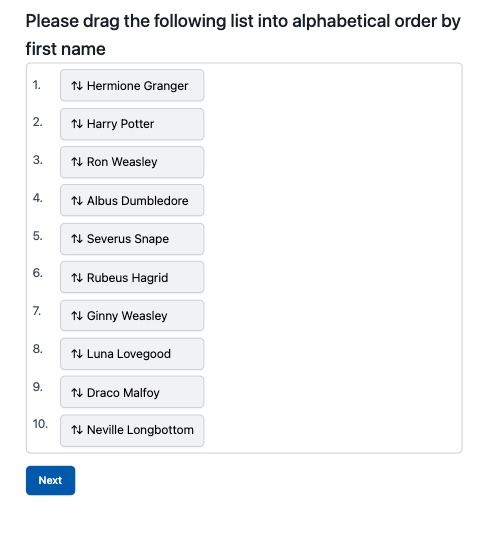
List Sorter
The list-sorter presents participants with a list of options that they can drag and drop into any order they wish. This is useful for prioritization and ranking tasks.
Example:
---
name: example/listSorter.md
type: listSorter
---

## Please drag the following list into alphabetical order by first name

---

- Hermione Granger
- Harry Potter
- Ron Weasley
- Albus Dumbledore
- Severus Snape
- Rubeus Hagrid
- Ginny Weasley
- Luna Lovegood
- Draco Malfoy
- Neville Longbottom
Multiple Choice
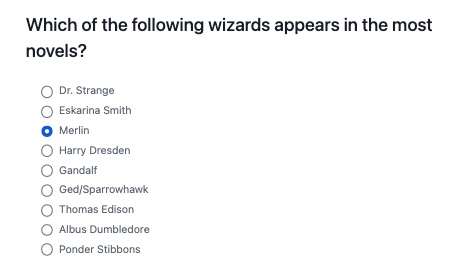
Prompts can be structured as multiple choice questions by setting the type to multipleChoice.
You can set several metadata flags to change the behavior of the question:
select[single(default) ormultiple] - force participants to select a single option (i.e., radio buttons) or allow them to select more than one option (i.e., checkboxes)shuffleOptions[true,false(default)] will randomize the order of the response options before displaying them to participants, storing the displayed order with the data
Example:
---
name: example/multipleChoice.md
type: multipleChoice
---

## Which of the following wizards appears in the most novels?

---

- Dr. Strange
- Eskarina Smith
- Merlin
- Harry Dresden
- Gandalf
- Ged/Sparrowhawk
- Thomas Edison
- Albus Dumbledore
- Ponder Stibbons
Open Response
Prompts can be structured as open response questions by setting the type to openResponse
You can set several metadata flags to change the behavior of the question:
rows[positive integer, e.g. 5] will make the response box 5 (or other specified number) lines tall.minLength[positive integer] will display a character counter showing progress toward the minimum required characters (e.g., "(25 / 50+ characters required)") This only influences the display, you need to check for minimum length as a condition on stage submission if you want to enforce the minimum length. Character counters appear in the lower right corner of the text area and update in real-timemaxLength[positive integer] will display a character counter showing remaining characters allowed (e.g., "(125 / 200 chars max)") This will enforce the cap, and not allow more characters to be entered.- When both
minLengthandmaxLengthare specified, displays as "(current / min-max chars)" format
Example:
---
name: projects/example/testMinLengthOnly.md
type: openResponse
rows: 4
minLength: 50
maxLength: 200
---

# Test Character Counter

Please write a response that is between 50 and 200 characters.

---

> Please enter your response here.

slider
min: 0(required) - minimum value of the slidermax: 100(required) - maximum value of the sliderinterval: 1(required) - step size for the slider (must satisfy: min + interval <= max)labelPts: [0, 20, 50, 80, 100](optional) - array of values where tick marks and labels should appear. If not specified, labels will be evenly spaced across the slider range.- When
labelPtsis specified, the number of entries must match the number of labels in the response section - The slider initially appears without a thumb to avoid anchoring effects. When the user clicks on the slider bar, a value is set and the thumb appears
- Labels are centered under their corresponding tick marks with intelligent text wrapping
Example:
---
name: projects/example/sliderExample.md
type: slider
min: 0
max: 100
interval: 1
labelPts: [0, 20, 50, 80, 100]
---

# How warm is your love for avocados?

---

- Very cold
- Chilly
- Tolerable
- Warm
- Super Hot
